Nursing & Scheduling

Hospital Staff Scheduling: Doctor Hours, Nurse Roster & Shifts

How hospital staff scheduling works — doctor OPD hours, nurse duty rosters by nursing unit, shift coverage, nurse-to-patient ratios, leave and attendance in one system.

SK

Subash Kandasamy

Founder, Uyirly

10 min readUpdated 10 August 2026

In a hospital, “who is on duty right now?” is not a trivial question. A single day involves doctors running OPD sessions, nurses covering morning, evening and night shifts across several wards, approved leave taking people out, and a legal obligation to keep enough nurses on the floor for the number of patients admitted. Run on a paper roster or a WhatsApp group, this quietly breaks — a shift goes uncovered, a doctor’s clinic is double-booked, or a ward slips below its nurse-to-patient ratio without anyone noticing until it matters.

Hospital staff scheduling softwareputs all of this in one place: doctor OPD hours, nurse duty rosters, per-unit coverage, leave, and attendance. This guide explains how hospital scheduling actually works — doctors and nurses are scheduled very differently — and how a modern system keeps the published plan honest.

What “staff scheduling” covers in a hospital

Hospital scheduling is really three connected jobs, each with its own rhythm:

  • Doctor availability (OPD hours)— the weekly consulting sessions each doctor runs, so appointments and tokens can only be booked when the doctor is actually in.
  • Nurse duty roster— which nurses cover which shift, in which ward or nursing unit, every day.
  • Coverage & compliance— making sure each shift meets the required nurse-to-patient ratio, and that leave and attendance are reflected so the roster is trustworthy.

Treating these as one “scheduling” problem is what causes chaos. The rest of this guide takes them in turn.

Doctor OPD hours: scheduling availability, not shifts

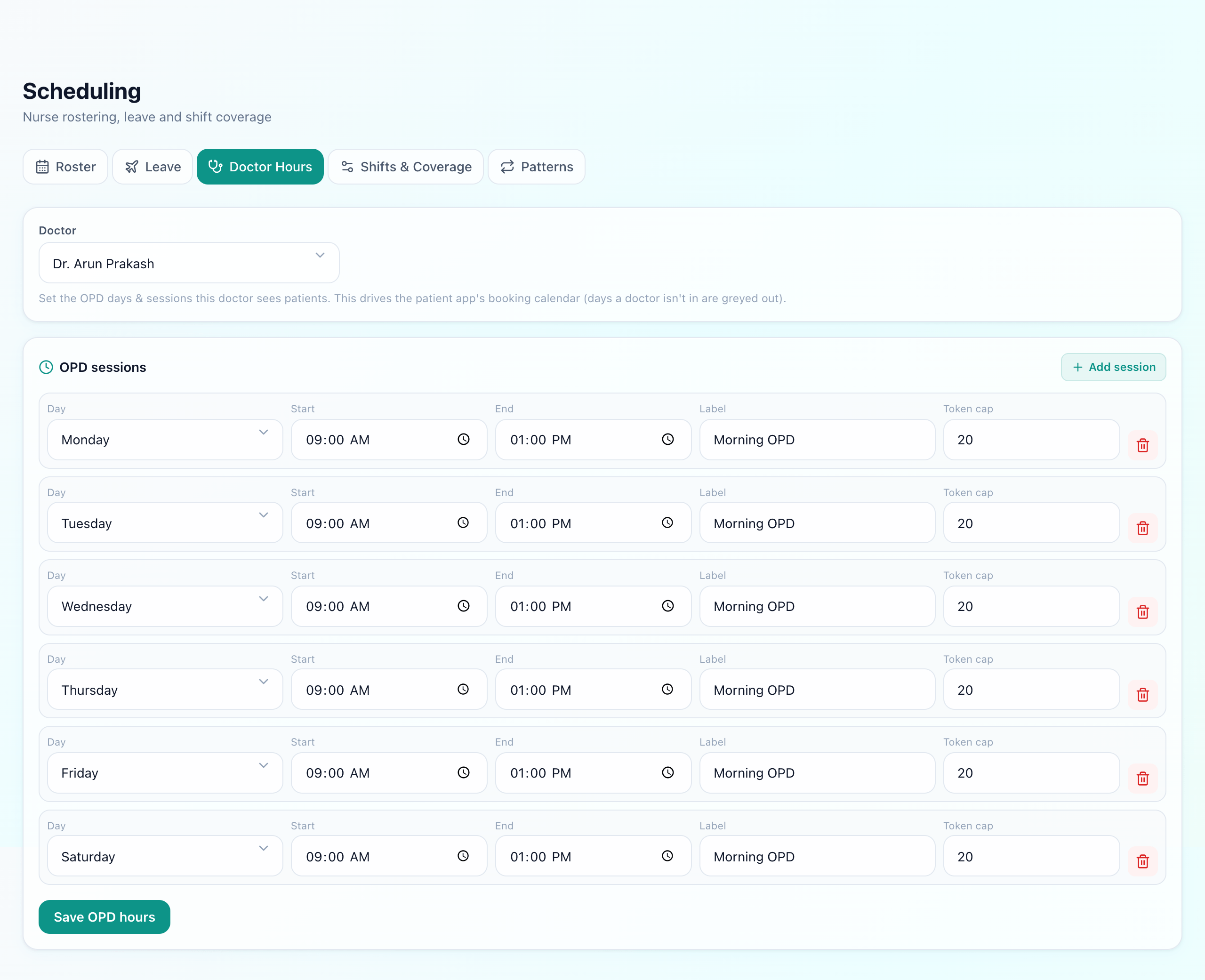
A consultant does not work a “shift” the way a nurse does — they hold OPD sessions: e.g. Dr. Aanya sees patients Mon/Wed/Fri, 10:00–13:00. Scheduling a doctor means publishing those weekly windows so the front desk (and patients booking online) can only place appointments inside them. In a token-based OPD — how most Indian hospitals run — this also decides which day’s queue a patient joins. If you want the deeper mechanics of tokens and queues, see the OPD token & queue management guide.

Why doctor hours belong in scheduling, not just the calendar

When a doctor’s availability lives in the scheduling system, an unavailable day automatically greys out for booking, follow-up recommendations respect it, and the OPD queue for that doctor only forms on days they actually consult. Kept on paper, double-bookings and “doctor on leave, patient already here” situations are inevitable.

The nurse duty roster

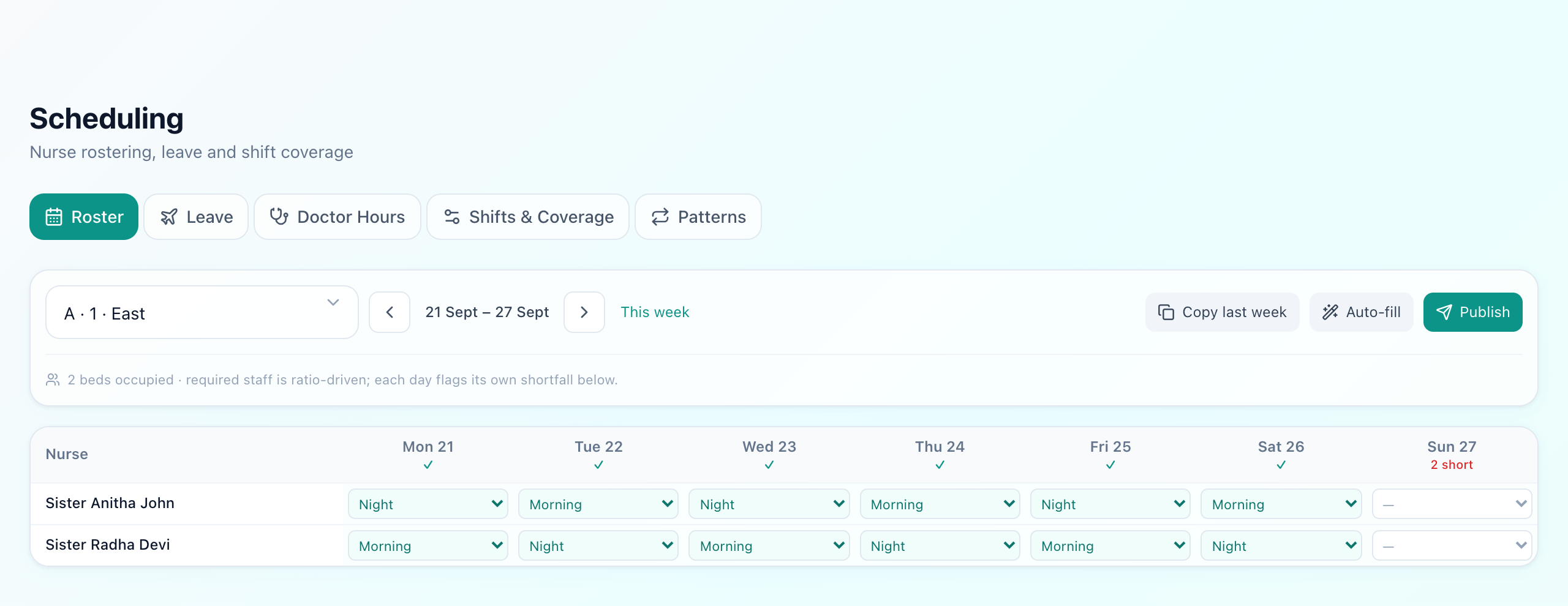
Nursing is shift work. A duty roster assigns each nurse to a shift— typically morning, evening and night — for a specific ward or nursing unit, for each date. Build it well and every shift has known, adequate cover; build it badly and you get last-minute scrambles, unfair distribution, and burnout. The mechanics of building a large roster (rotation, fairness, weekly publishing) are covered in depth in how to build a nurse duty roster; here we focus on how it fits the wider scheduling picture.

A day on the nursing roster

Nursing unit

Block / floor / wing

Shift

Morning / evening / night

Assign nurses

Against occupied beds

Check ratio

Meets required cover?

Publish

Roster visible to staff

Nursing units: how real hospitals are organised

Here is where paper rosters and simplistic software fall down. A ward is rarely a single room. In practice a hospital is laid out as blocks, floors and wings— for example “Block A, 1st floor, B wing” might hold ten mixed rooms, all staffed together from one central nursing station. Rostering and ratios apply to that nursing unit, not to each individual room.

Modelling this correctly matters because coverage is a property of the unit: you assign a set of nurses to the station for a shift, and they cover every occupied bed across its rooms. A system that only understands “rooms” forces you to fake this, and the ratio maths stops reflecting reality.

Scheduling · Nurse rosteruyirly.com

Nursing unit

Block A · 1F · B wing

Occupied beds

8 / 10

Required ratio

1 : 6

ShiftNurses assignedCover
MorningPriya, AnjaliOK
EveningFatimaOK
NightUnder-staffed
A nursing unit (block / floor / wing) rostered per shift, with live coverage against occupied beds.

Nurse-to-patient ratio & NABH compliance

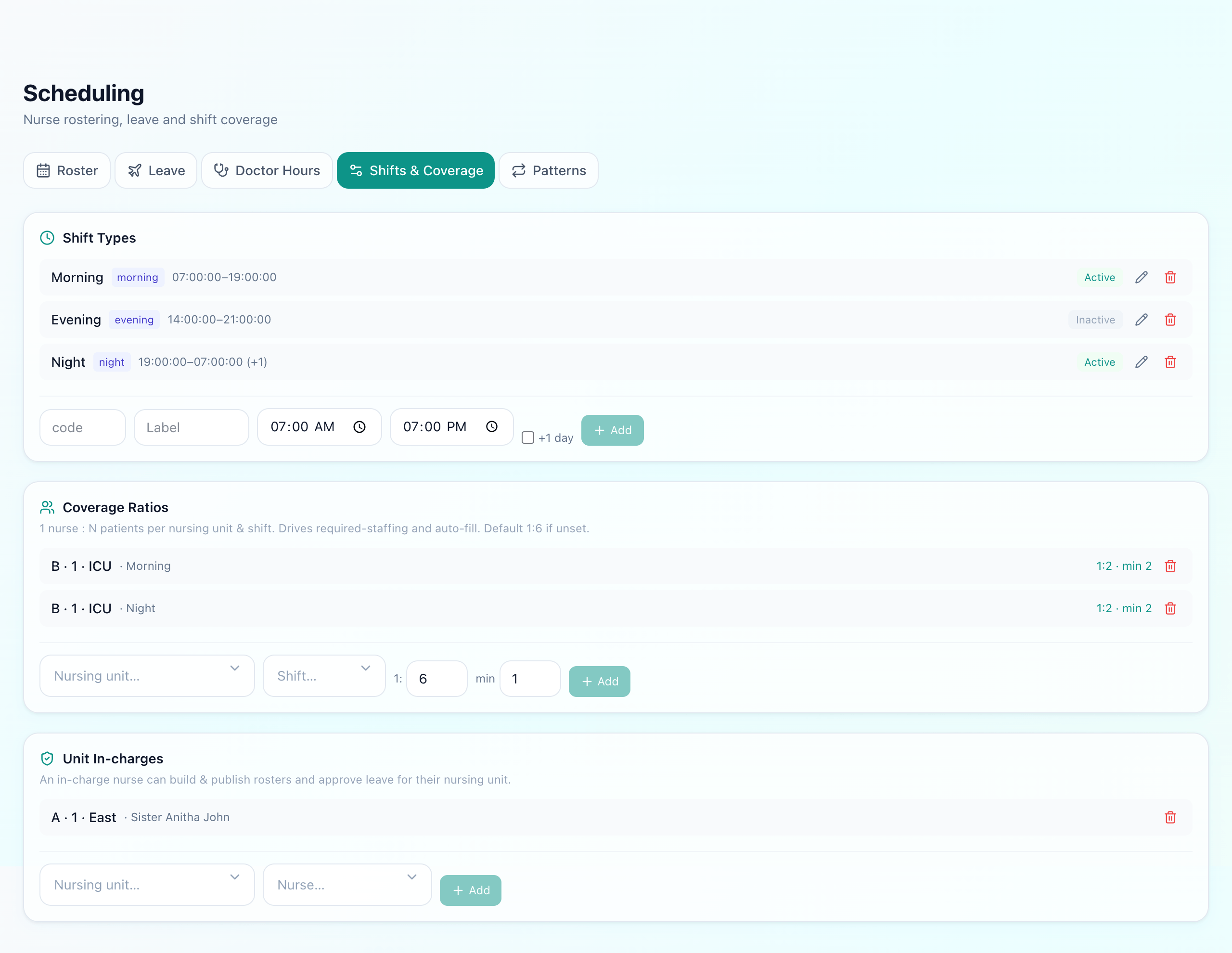
The number of nurses a shift needs is not a matter of preference — NABH and good clinical practice set expected nurse-to-patient ratios that vary by care level. Scheduling software earns its keep by making the required ratio configurable per unit and then flagging a shift that falls short for the beds actually occupied.

Typical nurse-to-patient ratios by care level

ICU / Critical1:1

1:1 – 1:2

HDU / Step-down1:3

~1:3

General ward1:6

~1:6

The full picture of ratios, care levels and what NABH expects is in the nurse-to-patient ratio (NABH) guide. The scheduling job is simply to hold the target per unit and surface the gap before the shift, so a supervisor can pull in cover rather than discover the shortfall after an incident.

Leave requests & approvals

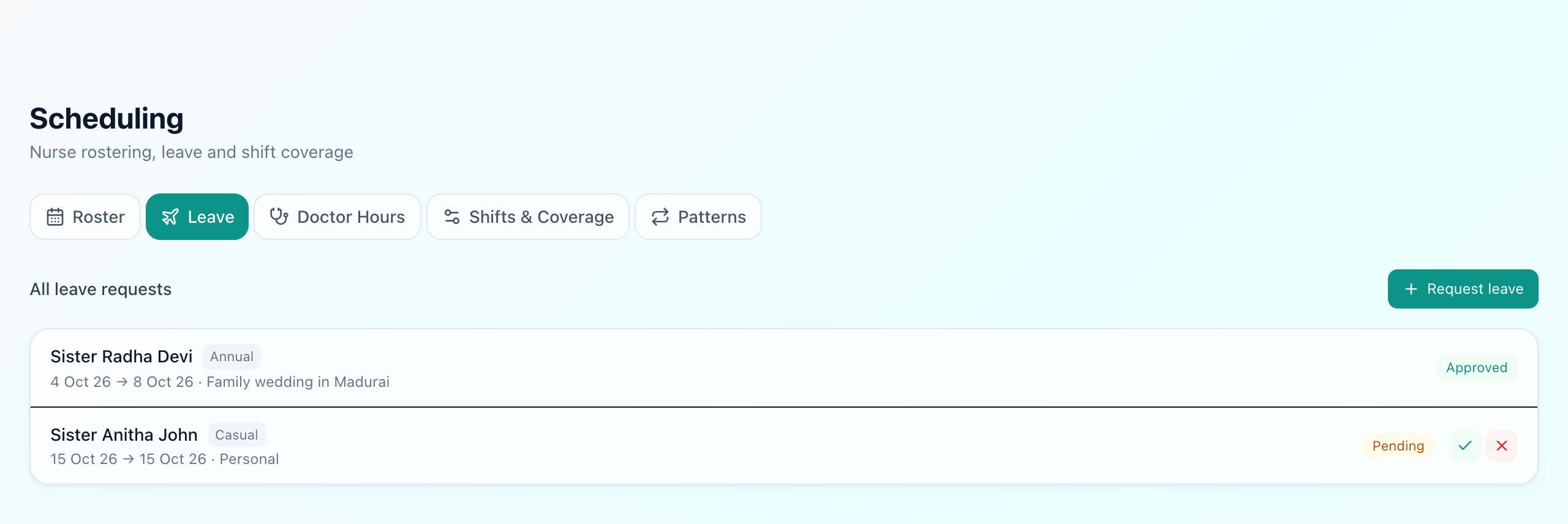
A roster is only as trustworthy as the leave data behind it. If staff request leave in a separate book, someone inevitably gets scheduled on a day they are off. Bringing leave into the same system closes the loop:

Leave that actually protects the roster

Request

Staff apply for dates

Approve / reject

Authorised approver

Roster blocks

Person not schedulable

Coverage recheck

Gap flagged if any

Once leave is approved, that person should simply not be assignable for those dates — and if their absence drops a shift below ratio, that shift should light up as needing cover. Leave, roster and ratio are one connected system, not three.

Attendance closes the loop

Scheduling says who should be on duty; attendance records who actually was. Keeping them in the same platform means you can compare planned versus worked hours, spot no-shows, and feed accurate hours into payroll and HR. The attendance side is covered in the staff attendance & HR guide— for scheduling, the key point is that the roster is the plan and attendance is the truth, and a good system holds both.

How far ahead to publish, and why cadence matters

A roster that appears the night before is almost as bad as no roster. Staff need enough notice to plan childcare, travel and personal commitments, and supervisors need a window to fix gaps before they become emergencies. Most well-run hospitals publish the nursing roster at least a week in advance, in a fixed weekly cadence, so everyone knows exactly when the next roster drops.

A predictable cadence also makes leave manageable: if the roster for next week is built every Thursday, leave requests for that week must land before Thursday, and the approver can see the coverage impact while there is still time to arrange a swap. When rosters are published erratically, leave requests and shift assignments collide constantly — the software should make the cadence effortless so it can actually be kept. The same discipline applies to doctor OPD hours: publish changes ahead of time so already-booked patients are never stranded by a session that quietly moved.

Common scheduling mistakes

  • Rostering by room, not by unit— coverage and ratios only make sense at the nursing-unit (block/floor/wing) level.
  • Separating leave from the roster— guarantees someone is scheduled on an approved day off.
  • Treating doctor hours like nurse shifts— doctors need published OPD availability that gates booking, not shift assignments.
  • Checking ratios after the fact— the gap must be visible before the shift, or it is just a report of a problem that already happened.
  • No single source of truth— a roster on paper, leave in a book and hours in a register can never agree.

What Uyirly offers

Uyirly brings doctor availability, nurse rostering, nursing units, ratios, leave and attendance into a single Scheduling module, so the plan on screen matches what happens on the floor.

3 shifts

Morning / evening / night, configurable

Per-unit

Block · floor · wing coverage

Live

Ratio flagged vs occupied beds

1 place

Roster · leave · attendance

Doctor OPD hoursare set on the Scheduling page (the “Doctor Hours” tab) and directly gate appointment booking — patients, and your own front desk, can only book a doctor on days and sessions they actually consult. On a token-based OPD this also drives that day’s queue.

Nurse rostering works at the nursing-unit level— you define units as block, floor and wing with a central station, set the required nurse-to-patient ratio for each, and assign nurses per shift. Uyirly shows live coverage against occupied beds and flags an under-staffed shift before it starts.

Scheduling · Doctor Hoursuyirly.com
DoctorDaysSession
Dr. Aanya SharmaMon · Wed · Fri10:00 – 13:00
Dr. Rahul NairTue · Thu17:00 – 20:00
Dr. Meera IyerMon – Sat09:00 – 12:00
Each doctor's weekly OPD sessions publish straight into appointment booking.

Leave is built in.Staff raise a leave request, an approver accepts or rejects it, and an approved leave removes that person from the roster for those dates — with coverage rechecked so any resulting gap is visible. And because attendance lives in the same platform, the published roster and the hours actually worked stay connected, ready for HR and payroll.

Set it up once

Model your wards as nursing units (block / floor / wing), set each unit’s ratio, publish your doctors’ OPD hours, and the day-to-day roster becomes a quick assign-and-check exercise — with under-staffed shifts and leave conflicts surfaced for you, not left to spot by eye.

Where scheduling fits

Staff scheduling does not stand alone — it plugs into admissions (occupied beds drive nurse requirements), OPD (doctor hours drive booking), and HR (attendance and leave). If you are digitising a hospital end to end, scheduling is one piece of the wider workflow described in how to digitize a hospital. Done right, it turns “who’s on tonight?” from an anxious phone call into a glance at one screen.

Frequently asked questions

What is hospital staff scheduling software?

Hospital staff scheduling software plans and publishes who works when — doctors' OPD consulting hours, nurses' shift rosters across wards, and duty coverage for each shift — in one place. A good system also enforces nurse-to-patient ratios, handles leave requests and approvals, and links to attendance so the published plan and the actual worked hours stay connected.

How is a nurse duty roster different from doctor scheduling?

A nurse duty roster assigns nurses to shifts (morning / evening / night) in a specific ward or nursing unit for each day, and must meet a minimum nurse-to-patient ratio. Doctor scheduling is about publishing each doctor's weekly OPD consulting hours so patients can be booked into the right session — it is availability, not shift coverage.

What is a nursing unit or nursing station?

A nursing unit (or nursing station) is a group of rooms — often a block, floor and wing, e.g. "Block A, 1st floor, B wing" — staffed together from one central station. Rostering and nurse-to-patient ratios are applied per nursing unit rather than per individual room, which is how most real hospitals are actually organised.

How does scheduling software help with NABH nurse-to-patient ratios?

It lets you set the required ratio per unit (for example 1:6 in a general ward, 1:1 in ICU), then flags a shift as under-staffed when the assigned nurses do not meet that ratio for the number of occupied beds — so the gap is visible before the shift starts, not after an incident.

Can staff request leave inside the scheduling system?

Yes. Staff raise a leave request, an authorised approver accepts or rejects it, and an approved leave removes that person from the roster for those dates so they are not scheduled by mistake — keeping the published roster and who is actually available in sync.

See this in your own hospital

Uyirly runs OPD, IPD, pharmacy, lab, billing and staff scheduling in one platform. 30-day free trial, no credit card.

Start free trial

Related guides