Ask a nurse in-charge how the duty roster gets made and you will rarely hear “software does it”. More often it is a WhatsApp group, a sheet on the notice board, and a lot of memory. That works for fifteen nurses. Somewhere past forty it stops, and past a hundred it becomes a patient-safety problem rather than an inconvenience.
The roster is not one big problem
The common mistake is to imagine that rostering a thousand nurses means scheduling a thousand nurses. Nobody does that. Rostering is owned per unit, by someone who knows that team.
1,000
nurses in a large hospital
~30
units, each with its own in-charge
20–40
nurses per in-charge to roster
Software should mirror that, and Uyirly does: the roster is scoped to a nursing unit— a block, floor and wing — and a nurse named as that unit's in-charge can build, publish and approve leave for it without being an administrator of the whole hospital.
Step 1 — The week grid
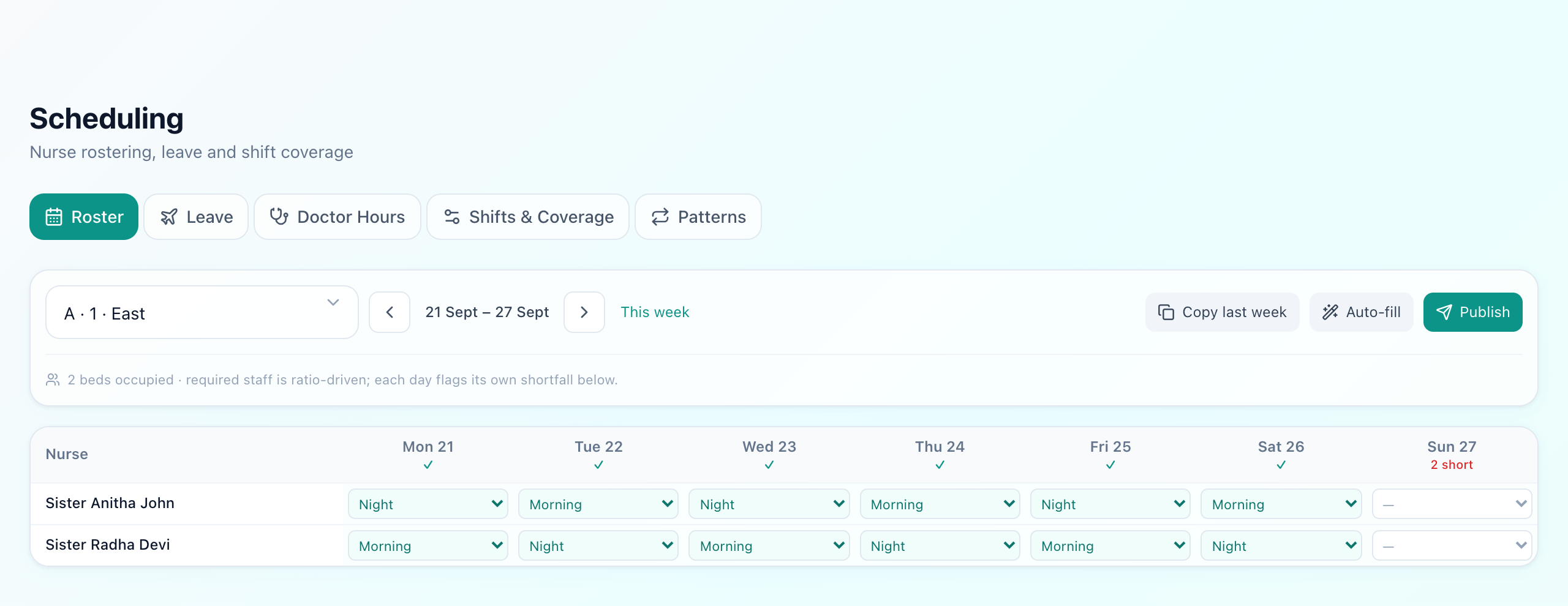
Nurses down the side, days across the top, a shift in each cell. Two things in this picture are worth pointing at:
- The unit selector. The grid is always one unit at a time, because that is the scope a person can actually hold in their head.
- The header under each day. A tick means the day meets its required staffing; 2 short means it does not. That number is computed, not typed — more on it below.
A nurse can hold only one shift per day across the whole hospital, which the database enforces rather than trusting the grid. You cannot accidentally roster the same person into two units on the same morning.
Step 2 — Not building it from scratch
How a week actually gets built
Copy last week
Most nurses repeat
Apply a pattern
For cyclic teams
Auto-fill
Close the ratio gaps
Publish
Drafts become the rota
- Copy last week clones the previous week into the empty slots. It leaves anything already filled alone, so it is safe to press on a half-built week.
- Patterns stamp a repeating rotation — say seven mornings, two off, seven nights, three off — across the weeks for the nurses assigned to it, anchored to a start date so the cycle stays in phase from one month to the next.
- Auto-fill works out what each shift needs, counts who is already on, and assigns the shortfall from available nurses — picking the nurse with the fewest shifts so far, so the machine does not quietly overwork whoever happens to sort first.
All three skip anyone on approved leave
Everything built this way lands as a draft, shown dashed on the grid. Publishing is a separate, deliberate act, because a roster staff can see is a promise and a half-finished one causes more trouble than no roster at all.
Step 3 — How “2 short” is calculated
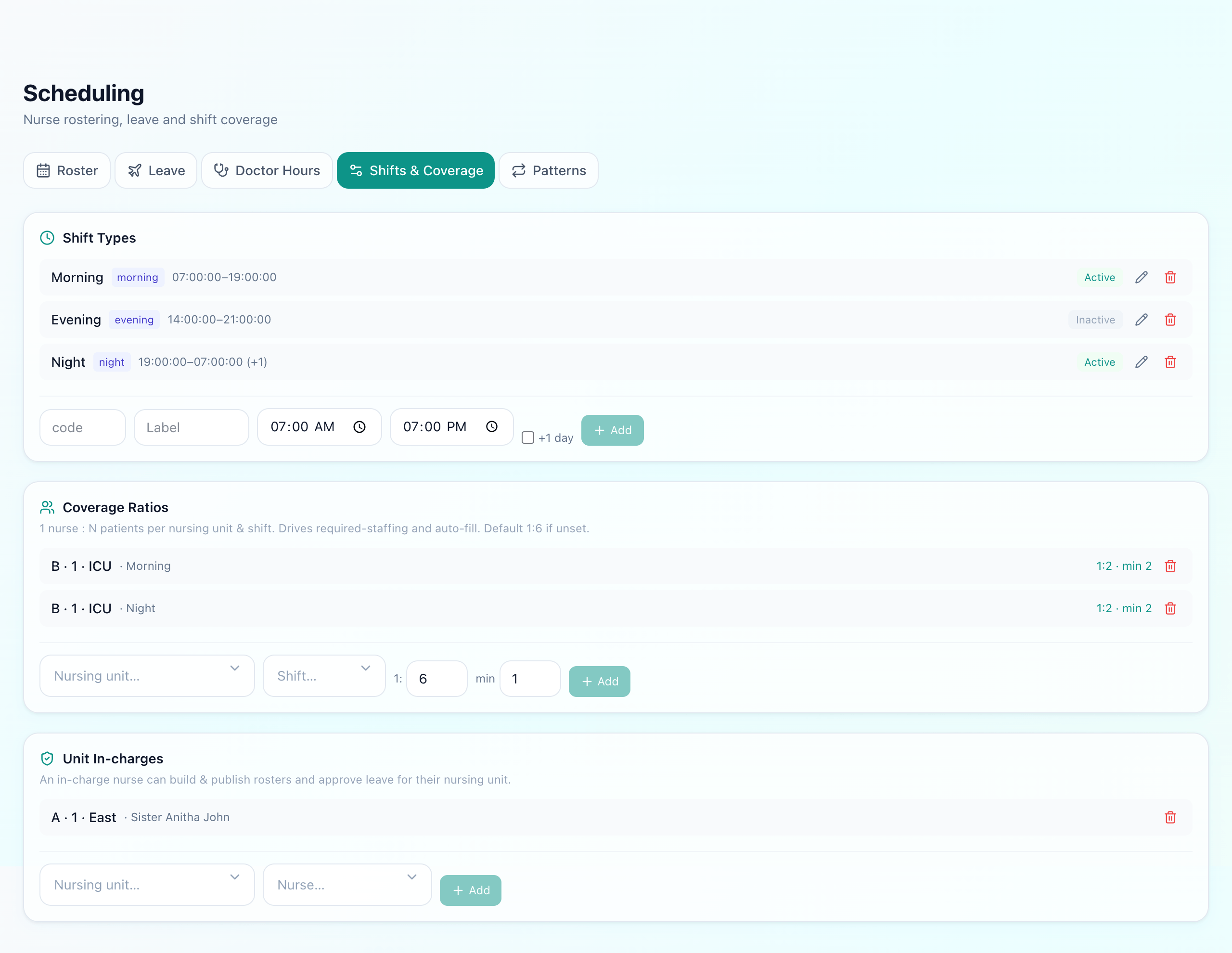
Required staff for a shift is occupied beds ÷ ratio, rounded up, with a minimum so a quiet ward is never left empty. Both the ratio and the minimum are set per unit and per shift, because an intensive care unit at 1:2 and a general ward at 1:6 are not the same question. Units with nothing set fall back to 1:6.
The bed count is live — it is the patients actually admitted into that unit's rooms right now, not the ward's capacity. A ward that is half empty does not demand a full complement, and one that has filled up says so on the roster before the shift starts rather than after.
Note the shift types in the screenshot: this hospital runs two twelve-hour shifts, so eveningis switched off and does not count towards coverage. Turning a shift off is how a ward says which pattern it runs, rather than showing a permanent shortfall for a shift nobody works.
For the ward-by-ward ratio table and the NABH context behind it, see our nurse-to-patient ratio guide.
Step 4 — Leave
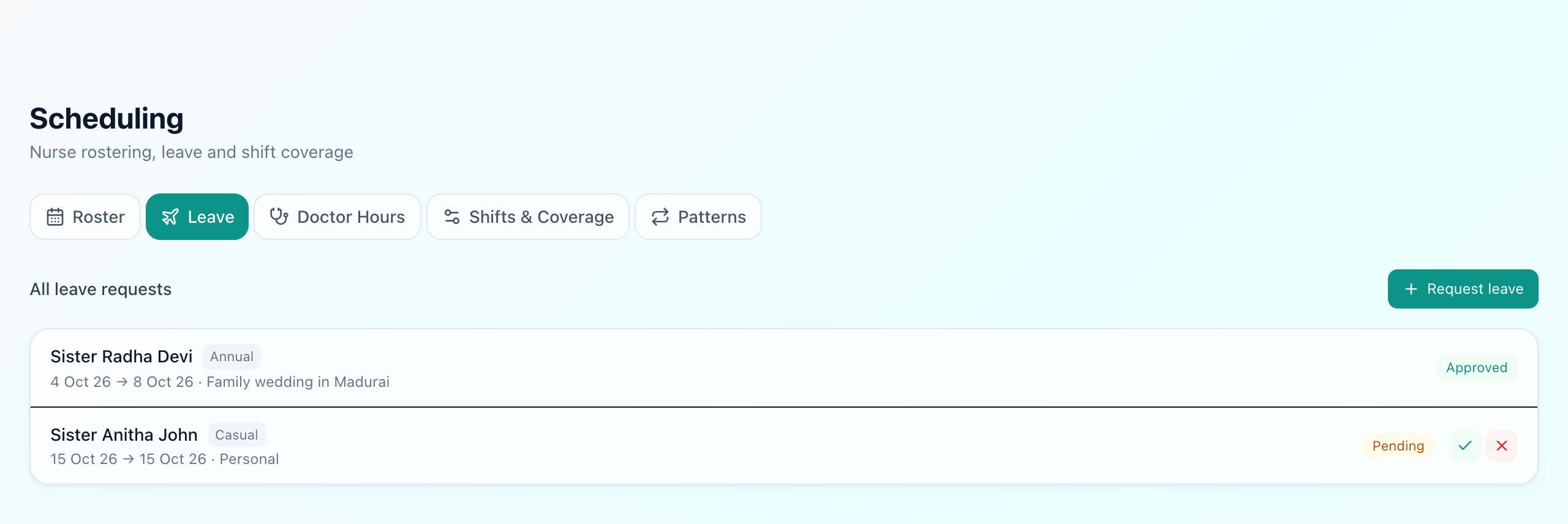
Planned leave is requested with a type and a date range and approved by the in-charge or an admin. From that moment it is a fact the roster respects: the generator will not place that nurse on those days, and the shortfall shows up in the week header where someone can still do something about it.
Same-day sickness is the harder case, and no scheduler can plan for it. What helps is speed — seeing immediately who else is free. That is exactly what the nurse picker does when a patient is assigned (below).
From roster to patient assignment
The roster answers “who is on duty”. A separate question is “who is looking after this patient”, and the assignment is roster-aware: the picker lists nurses rostered to that unit and shift first, then everyone else, with anyone on approved leave sorted to the bottom and marked. Each nurse shows how many patients they already hold against the unit's ratio, so an overloaded nurse is visible before another patient is added.
It warns rather than blocks. A patient can never be refused care because the ward is short — the job of the software is to make the overload visible so help gets pulled in.
For the admission and bed side of this, see the IPD admission and bed management guide; for attendance on the day, see staff attendance.
What Uyirly does
- A week grid per nursing unit, built and published by that unit's in-charge.
- One shift per nurse per day, enforced in the database rather than by convention.
- Copy last week, cyclic patterns anchored to a start date, and ratio-driven auto-fill.
- Auto-fill that spreads work by who has the fewest shifts so far.
- Approved leave excluded from every generation route.
- Per-day shortfall from live occupied beds against a per-unit, per-shift ratio and minimum.
- Shift types a ward can switch off when it does not run them.
- Drafts until published, so staff never read a half-built rota.
- A roster-aware nurse picker showing load against capacity at patient assignment.
Getting started
Rostering is part of Uyirly's hospital management software. See the nurse-to-patient ratio guide for the NABH context, or start a 30-day free trial with no credit card.