Dentistry looks like OPD from a distance — a patient, a chair, a consultation — but the record is a different shape. Almost everything a dentist does is anchored to a particular tooth, and much of it recurs over months. Dental software is really about those two things.
Step 1 — The chart
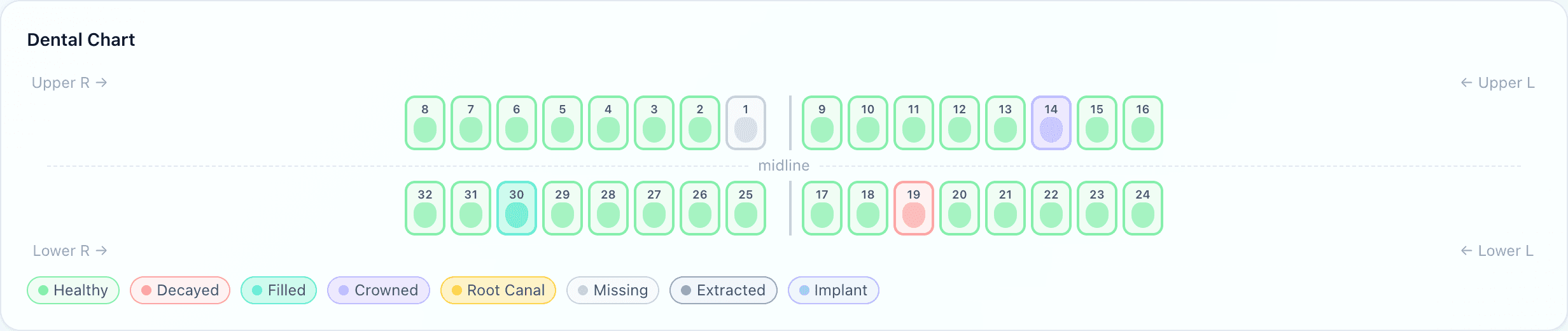
The chart is the dental record. Each tooth carries a state — healthy, decayed, filled, crowned, root canal, missing, extracted or implant — and clicking one opens it to record a finding or a procedure. Uyirly uses the Universal Numbering System (1–32), laid out as the dentist sees the patient: upper right to upper left across the top, lower arch below, with the midline marked.
FDI or Universal — pick one and stay on it
Step 2 — Recording what was done

A treatment is logged against the tooth, with a note and a price. Two things then happen without anyone doing them:
- The chart updates itself. Recording a filling turns that tooth filled; an extraction turns it extracted; a crown, a root canal and an implant likewise. The chart is a consequence of the work rather than a second thing to keep in step with it.
- The charge reaches the bill. The price is captured at the time the procedure is recorded, so a later change to the tariff does not quietly rewrite what this patient was told.
Because the history is per tooth, a dentist who has never met the patient can open the chart and read the mouth — which is the whole point when a course of treatment runs across several visits and more than one chair.
Step 3 — Bringing the patient back
Cleanings, reviews and staged work all depend on the patient returning at the right time. A recallis a date and a reason parked on the patient's record — six months for a scale and polish, three weeks for a review — and the clinic gets a list of who is due, which staff work through and mark off as they contact people.
A due list is not an automatic reminder
What dentistry shares with the rest of the hospital
The dental screen replaces the clinical part of a consultation, not the consultation. The patient is the same record with the same UHID, allergies included; the prescription reaches the same pharmacy; and the consultation fee and the procedure charges land on the same bill, which matters when a patient sees the dentist and the physician in one trip.
The screen appears for any doctor in a department set to the dental template — so a standalone clinic and a hospital's dental department are the same setup, with a different number of departments around it.
What Uyirly does
- A full-mouth chart in Universal numbering, each tooth in one of eight states.
- Procedures recorded against a tooth, with notes and the price at the time.
- The chart updated from the procedure — a filling makes the tooth filled, an extraction extracted.
- Treatment history per patient, readable by whichever dentist sees them next.
- Recalls with a date and reason, and a due list staff work through.
- The same patient record, allergies, prescriptions, pharmacy and bill as the rest of the hospital.
Getting started
Dental runs standalone or as a department inside Uyirly's hospital software — see dental clinic software for the whole picture, or start a 30-day free trial with no credit card.