A hospital pharmacy is really two operations wearing one name. One side looks like a retail pharmacy: walk-in patients, a prescription, immediate payment. The other is a supply chain into every ward — medicines issued against inpatient orders, charged to a running bill, tracked by batch and expiry the whole way. A module that only handles one of them well is not a hospital pharmacy system.
This guide walks through how that works in practice, screen by screen: getting stock in, keeping it straight, handing it over, and the records the law expects you to keep. Every screenshot is of the running product, taken from a demo hospital.
What a pharmacy day is made of

The counts are the point. Dispense is how many prescriptions are waiting, IPD Ward how many ward requests are unfilled, Alerts how many medicines need attention. A pharmacist can read the state of the shelf without opening anything.
Step 1 — Getting stock in
Stock arrives as a distributor's invoice: one supplier, one invoice number, twenty or thirty medicines under it. So that is how it is entered — the invoice once at the top, then a line per medicine with only the things that change.
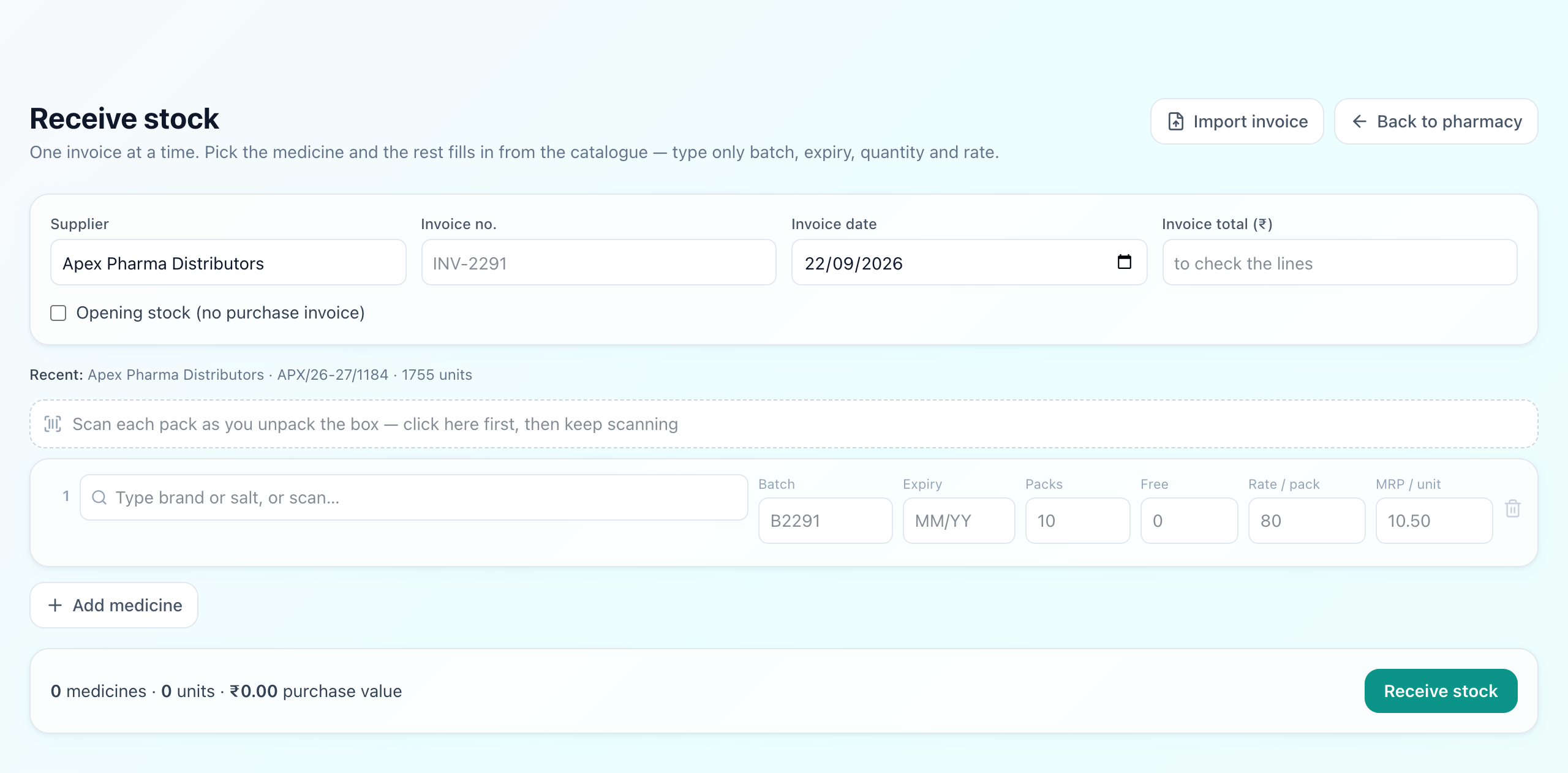
Picking the medicine fills in its pack size, HSN code and GST rate from a catalogue of roughly 15,000 molecules and 240,000 Indian brands, so a line is four fields rather than twelve. Type the expiry as it is printed on the pack — 09/28 — and it is stored as the last day of that month. The running total at the foot is compared with the invoice total you entered, so a missed line or a mistyped rate surfaces before saving rather than at the next stock take.
Or let the invoice type itself
A thirty-line invoice is still a hundred and twenty fields. If the distributor sends a CSV — or you can copy the rows out of an Excel sheet — the whole thing can be read in one go.
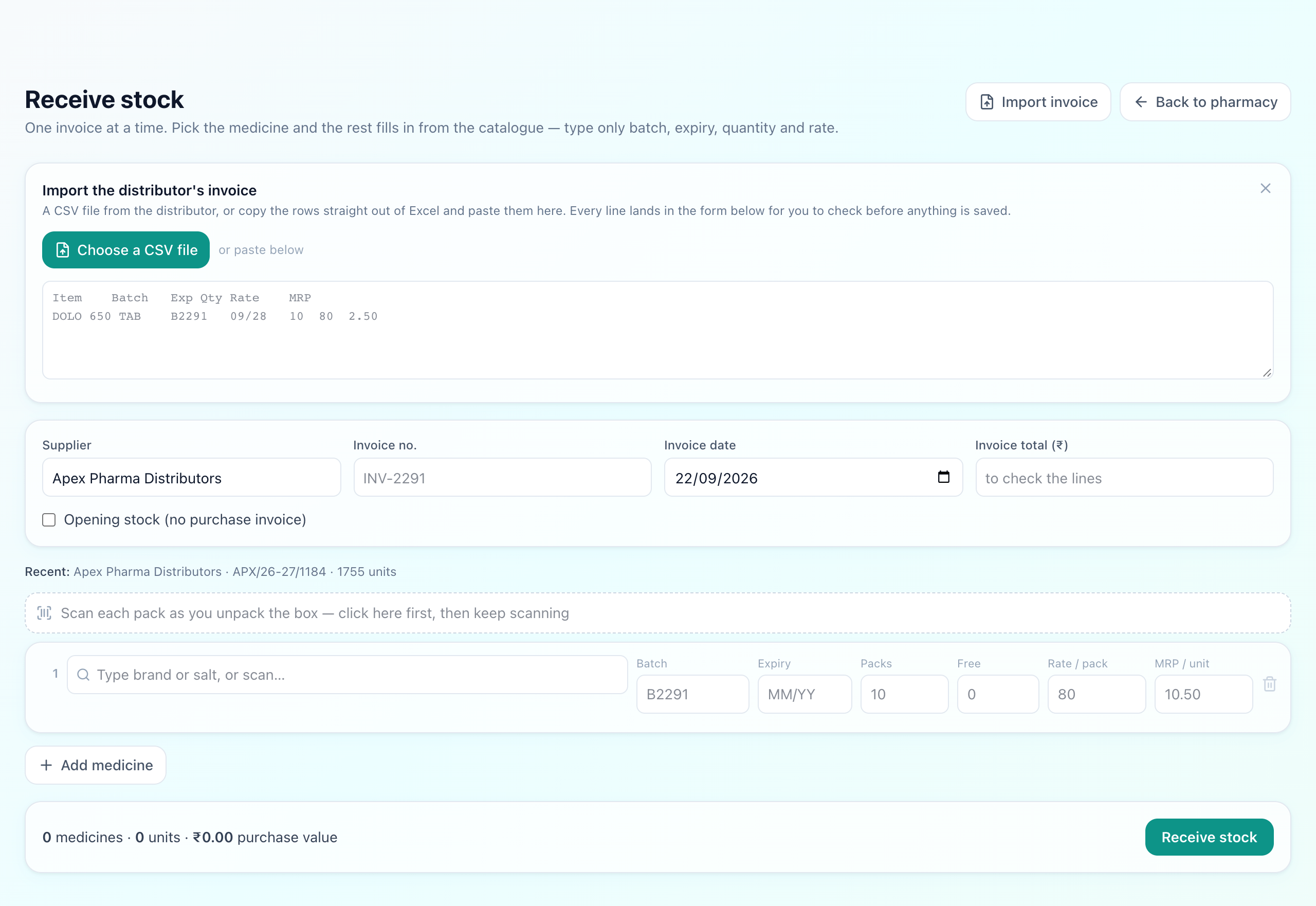
Exports usually open with the shop's name and GSTIN, so the header row is found by looking for the one that names the most columns. Headings like Item, Particulars, B.No, Exp. Date and PTR are recognised on sight; anything it cannot place is a dropdown away. Expiry is understood however it is printed — 09/28, 30-11-2027, Mar-28, 2028-06-30.
Each medicine name is then matched against the catalogue. DOLO 650 TAB 15'S is stripped of its pack and form words before searching, so it finds the brand Dolo 650. A confident match fills the line; a guess is marked check; anything unmatched arrives with the invoice's own wording sitting in the search box, ready to pick.
MRP per strip, or per tablet?
Step 2 — Keeping the shelf straight
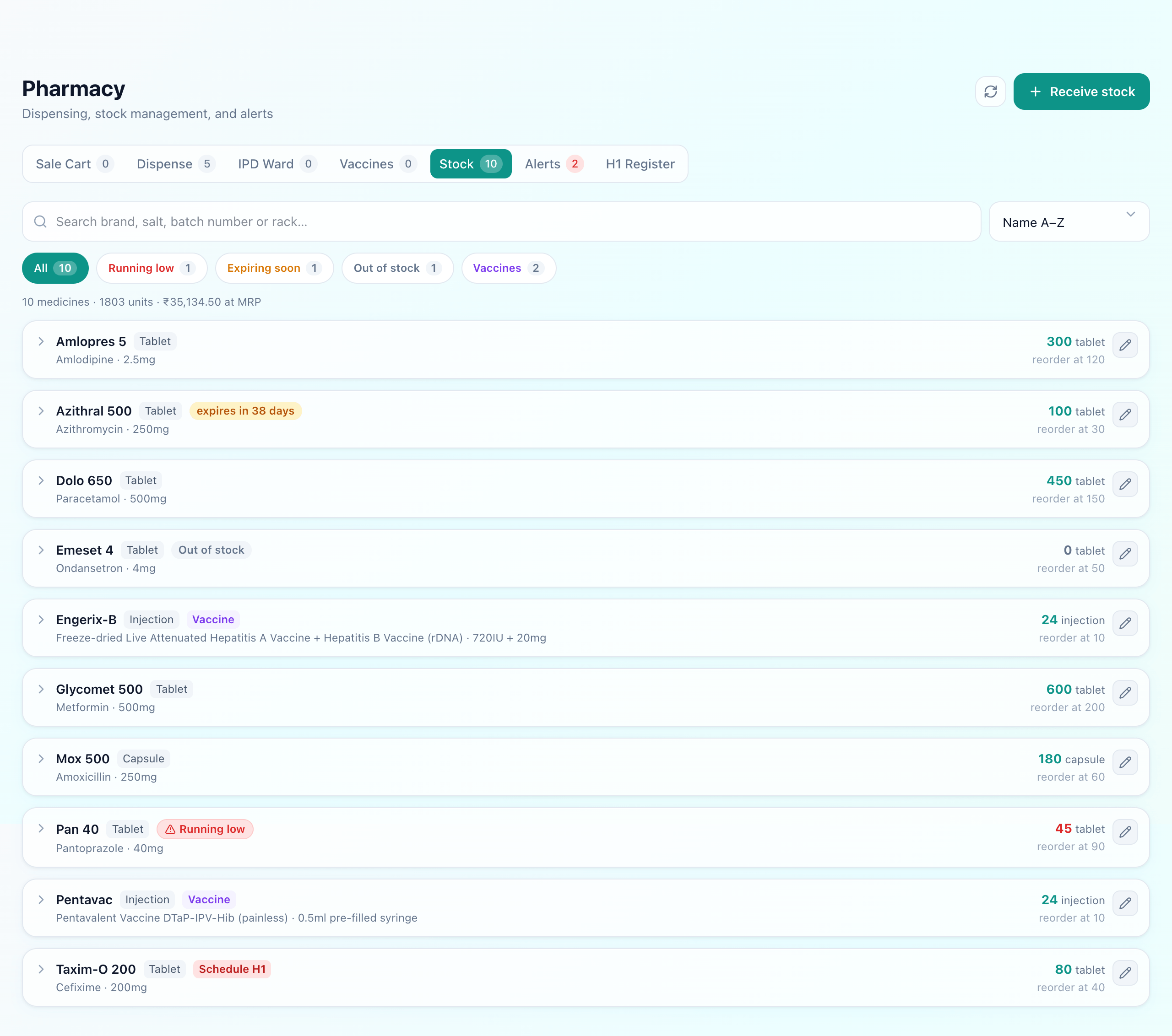
Search reaches the brand you bought, the salt, the batch number and the rack label — so a strip in hand or a shelf tag finds the medicine. The chips narrow the list to what needs doing, each with its own count:
- Running low — at or below the reorder level set for that medicine.
- Expiring soon — a batch within 90 days of expiry, while it can still be used or returned.
- Out of stock — nothing left, so it appears when you are ordering rather than when a patient asks.
- Vaccines — the cold-chain items, which have screens of their own.
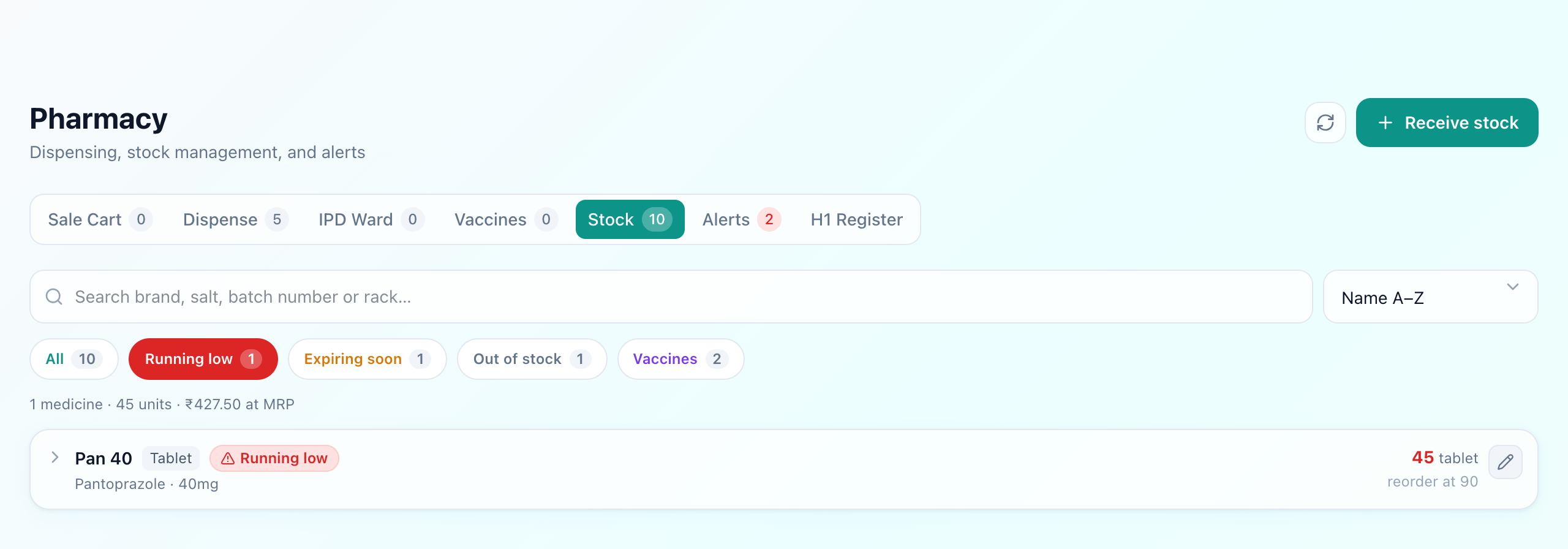
Opening a row shows its batches, earliest expiry first, with the rack each sits on and who it was bought from — which is what you need when a batch has to go back to the distributor. Reorder level, quantity, MRP, cost and rack can all be corrected in place.
What the alerts are for
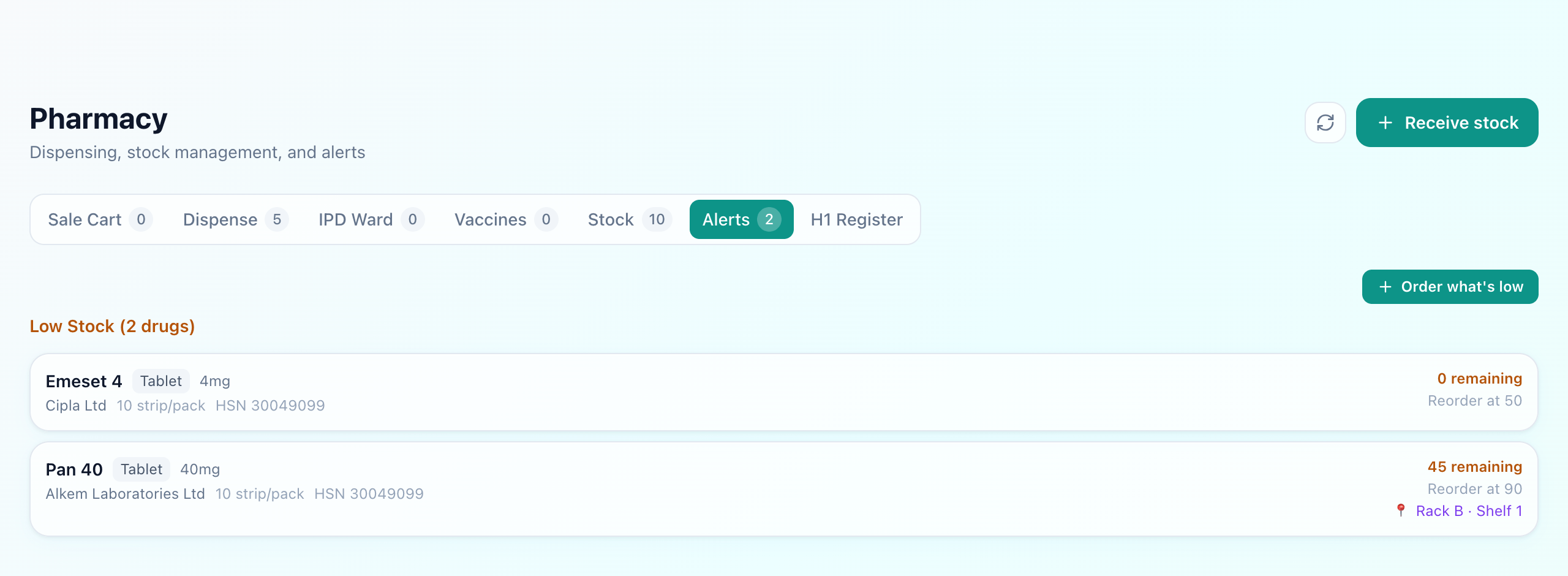
Order what's low opens the receive screen with every medicine below its reorder level already listed, carrying its last supplier, pack, rate and a suggested quantity. It is a starting point you edit, not an order sent to anyone. Formal purchase orders to suppliers live in the inventory module, which tracks consumables rather than medicines.
Step 3 — Handing medicines over
Two paths, one stock
OPD walk-in
Prescription → sale → paid now
IPD ward request
Order → dispense → billed to the stay
Both draw on the same physical stock, which is exactly why they belong in one system. A medicine issued to a ward reduces the same count as one sold across the counter — otherwise recorded stock drifts from what is on the shelf, and nobody notices until a stock take.
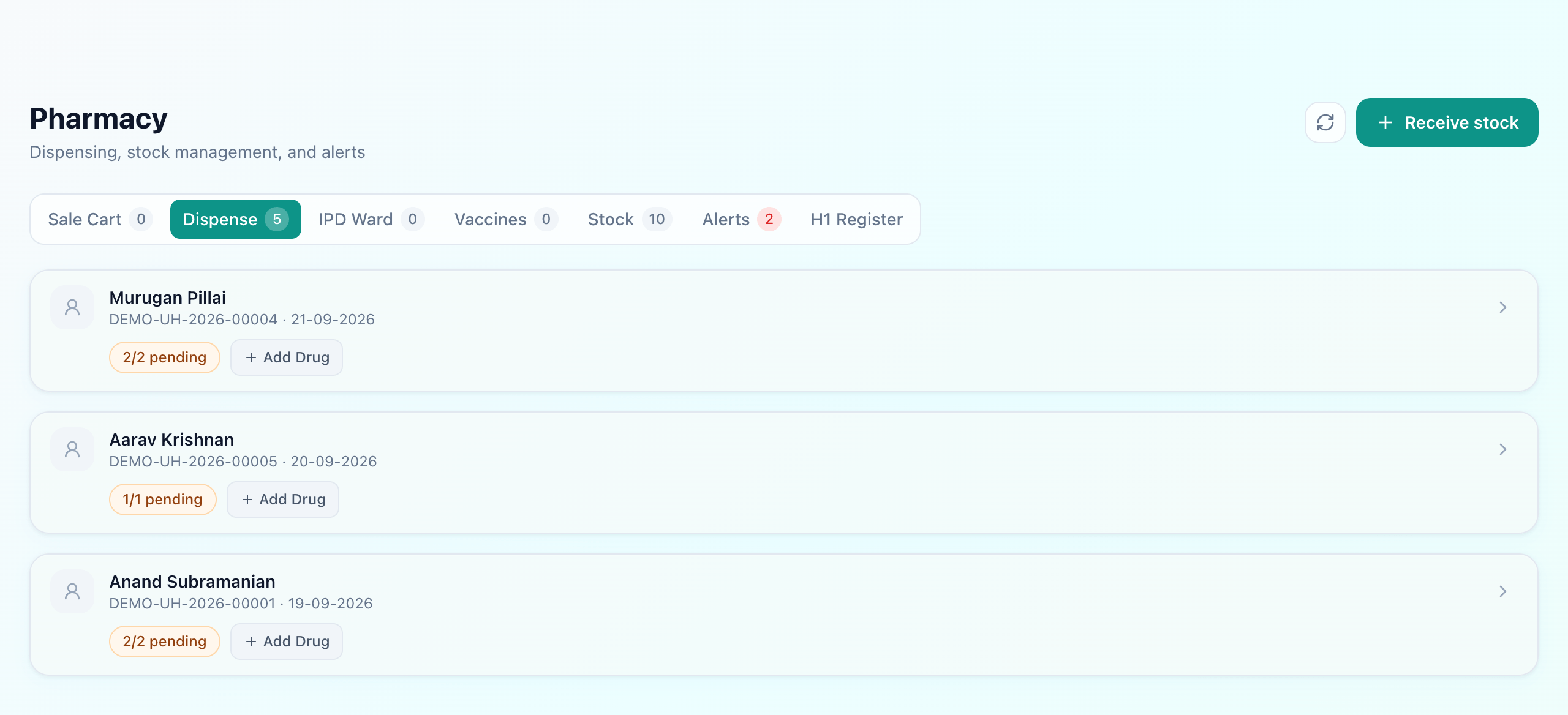
A prescription written during the consultation arrives here by itself — no retyping, and the medicine handed over is the one the doctor actually wrote. The earliest-expiring batch still in date is used first, so nothing quietly ages out at the back of the shelf, and an expired batch cannot be sold at all.
Scanning the pack
Any keyboard-wedge barcode scanner works, with nothing to configure — the counter recognises a scanner by how fast it types. The catch with medicine barcodes is that only about 300 formulations must carry a QR code today, and the plain EAN-13 on nearly every other pack identifies the product while carrying no batch and no expiry.
So the counter learns. The first time an unknown pack is scanned you say once which medicine it is; every scan after that goes straight into the bill, and scanning the same pack again adds one more. Where a pack does carry a GS1 code, its batch and expiry are read as well. Receiving stock is the natural moment to teach codes, because the box is in your hand and you are about to say what it is anyway.
Your own labels, for the exact box
Step 4 — The records the law expects
Schedule H1 covers second- and third-line antibiotics and several habit-forming medicines. Rule 65(11A) requires every supply of one to be entered in a separate register — the patient, the prescriber, the drug, the quantity and the date — kept for three years and produced on inspection. Most pharmacies keep it as a paper logbook written up at the end of the day, which is exactly how entries go missing.
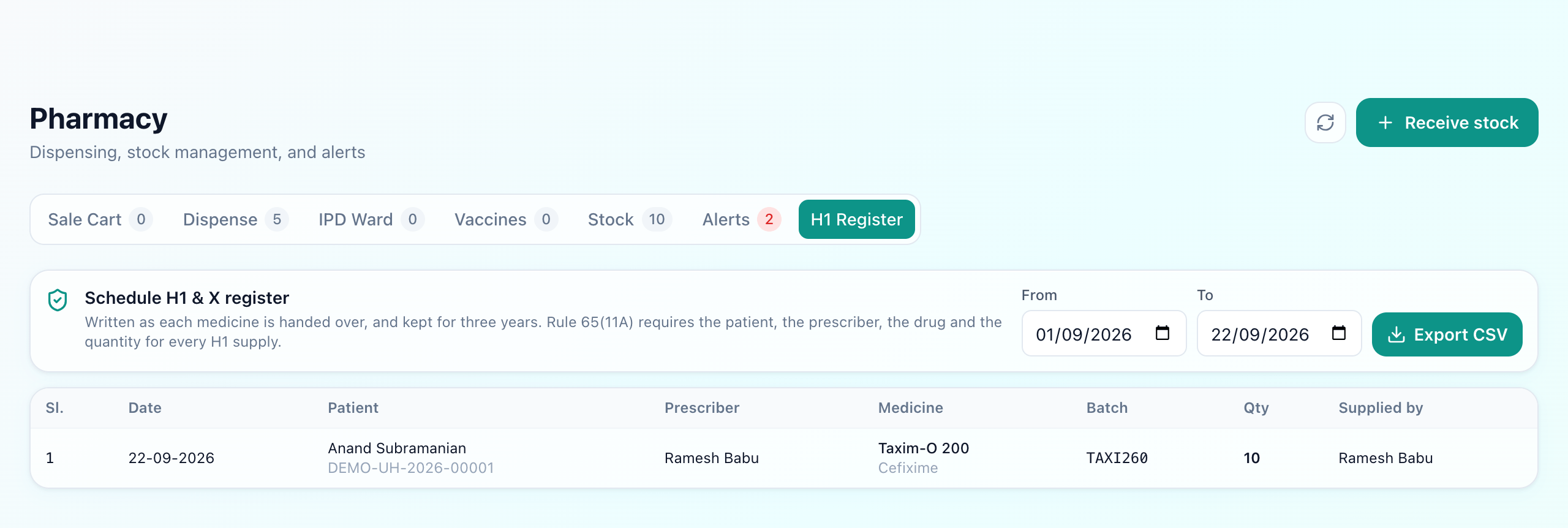
The catalogue already knows each medicine's schedule, so the entry writes itself the moment an H1 or X medicine is handed over — serial number, date, patient and UHID, prescriber, drug, batch, quantity, and who supplied it. The stock list carries a Schedule H1 badge on the medicine, so the pharmacist sees the duty before handing it over rather than after. Nothing in the app can edit the register once it is written.
For which drugs fall under each schedule and what the label warnings mean, see Schedule H, H1 & X drugs.
Step 5 — How it reaches the bill
For an OPD sale the transaction is the bill: the patient pays at the counter, and the stock moves when the medicines are handed over — after payment, not before. For a ward request the dispensed items become lines on that patient's running combined bill, so they see one bill at discharge rather than a stack of pharmacy slips. Our IPD billing guide covers how that bill comes together across every department.
The one-stock-count test
There is a fast way to tell whether a pharmacy module genuinely unifies OPD and IPD or merely runs them as two features under one login: dispense an item to a ward, then look at the same medicine on the sale screen. If the count dropped in both places it is one system. If it did not, the “single pharmacy module” is two stock ledgers wearing one interface — and that gap is exactly where physical stock and recorded stock drift apart.
What Uyirly's pharmacy does
- Receive a whole distributor invoice at once, or import it from a CSV or an Excel paste.
- Batch and expiry on every medicine, earliest-expiring used first, expired stock blocked.
- Search by brand, salt, batch number or rack; filters for running low, expiring soon, out of stock and vaccines.
- Barcode scanning that learns each pack once, and reads batch and expiry from GS1 codes.
- Printed stock labels, so a scan means one exact box rather than just the product.
- Schedule H, H1 and X shown on the medicine, and every H1 or X supply written to the register as it is handed over.
- One counter for OPD walk-in sales and IPD ward issues, drawing on the same stock.
- Low-stock flags start the next purchase already filled in.
Getting started
The pharmacy is part of Uyirly's hospital management software and shares the same patient and the same bill as the doctor. The quickest way to see it with your own stock is to import one distributor invoice — start a 30-day free trial, no credit card.