A Laboratory Information System has one job: take a test from the moment a doctor orders it to the moment a result reaches them, without anything getting lost, mixed up, or handed over on paper. Most of what goes wrong in a hospital lab is not analytical — the analyser is usually fine. It is a sample labelled by hand, a result phoned to a ward, or a report that never made it back into the patient's file.
The three states a test lives in
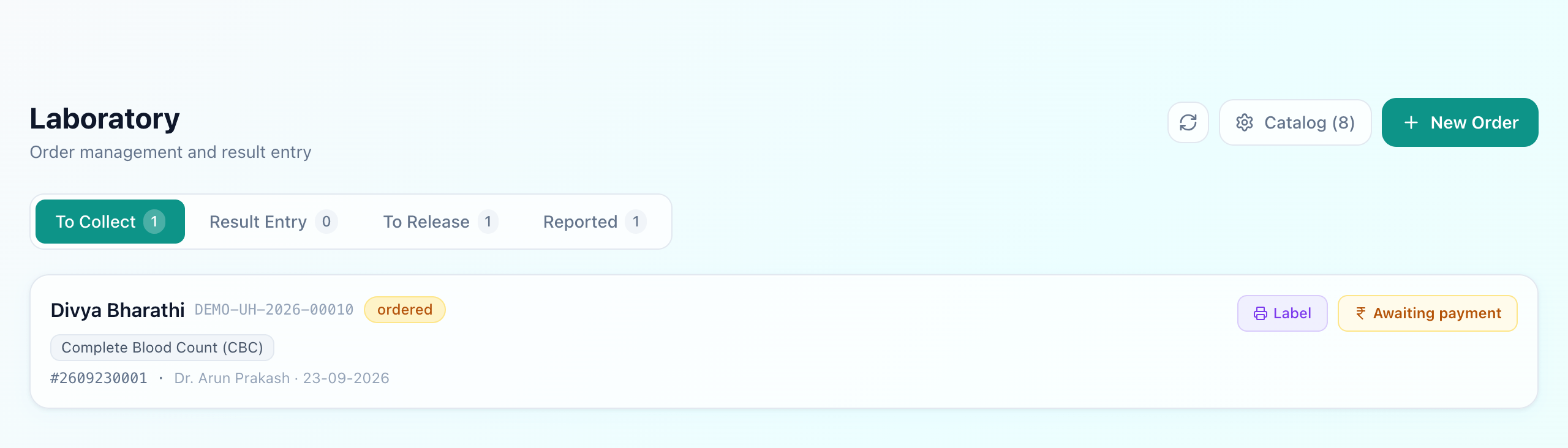
A lab worklist is only useful if it answers “what do I do next” rather than “what exists”. Three stages do that:
- To Collect — ordered, sample not yet taken. This is the phlebotomist's list.
- Result Entry — sample collected, results not yet entered. This is the technician's list.
- Reported — results entered and released to the doctor.
Every order carries an accession number— the lab's own identifier, separate from the patient's UHID and from the bill. It is what goes on the tube, and it is what makes a sample traceable when a tube arrives at the bench with nothing but a barcode on it.
Labelling the sample
The Label button prints a tube label carrying the accession number as a Code 128 barcode, with the patient name and the test beside it. This is the single highest-value thing a lab system does, and it is worth being blunt about why: a handwritten tube label is the most common route to a result being attached to the wrong patient. A printed barcode removes the handwriting and the transcription both.
Results, and what gets flagged
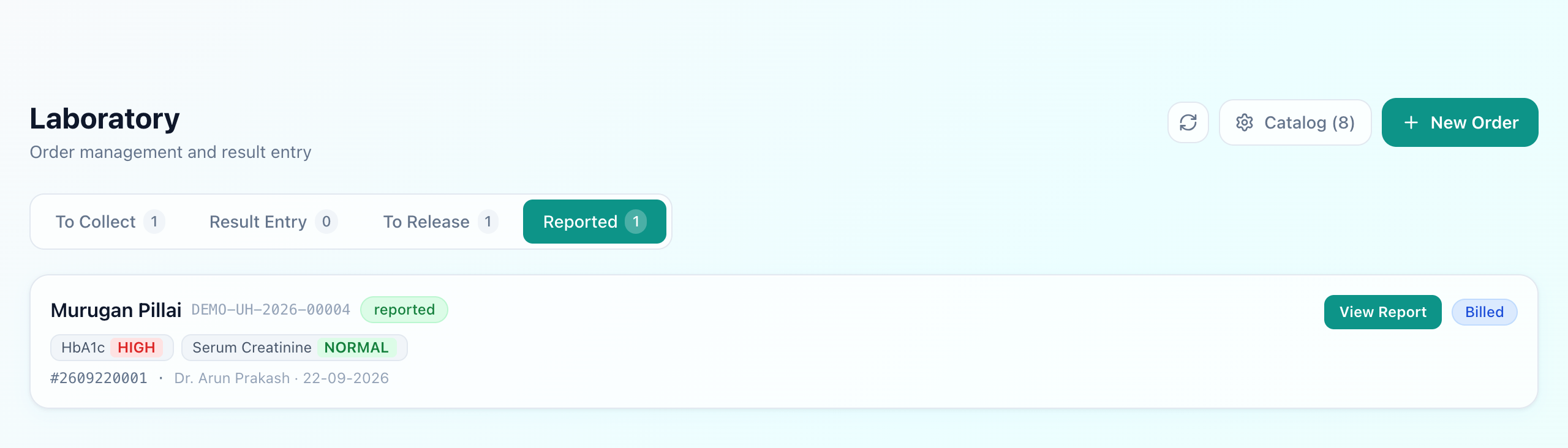
Each test in the catalogue carries its reference range. When a numeric result is entered it is compared against that range and flagged high or low automatically — nobody decides per result whether something is abnormal, and nobody has to remember the range for a test they run twice a month.
That flag is what makes a report scannable. A doctor reading twelve values wants the two that are outside range to announce themselves.
Where the order comes from, and where the charge goes
An order raised during a consultation arrives in the lab attached to that patient and that visit — no re-registration, no separate lab file. A ward order for an admitted patient behaves the same way and bills to the stay rather than to a counter. The charge follows the order: ordering the test is what creates it, so the lab does not have to tell billing what to charge. See IPD billing for how those lines land on one bill.
The report
A released report prints on the hospital's letterhead with the patient, the tests, the results, their reference ranges and the flags — the thing a patient carries to another doctor. Because it sits on the patient's record rather than in a lab folder, the next consultation opens with it already there.
What to check before buying
- Can it print a tube label? If samples are still labelled by hand, the rest of the system is decoration.
- Does the reference range live with the test? Flagging that depends on a technician remembering ranges is not flagging.
- Does an OPD order and a ward order behave the same? If the ward has its own parallel process, results will go missing from one of them.
What Uyirly does
- A worklist in three stages — to collect, result entry, reported — with counts on each.
- An accession number per order, printed as a Code 128 tube label with the patient and test.
- Reference ranges held on the test, with results flagged high or low automatically.
- Orders raised from an OPD consultation or a ward, both attached to the right patient.
- Charges created by the order itself, reaching the patient's bill without re-entry.
- Reports on the hospital letterhead, kept on the patient record.
Getting started
The lab is part of Uyirly's hospital management software, sharing one patient record with the consultation that ordered the test. Start a 30-day free trial — no credit card.