A complete blood count is around twenty numbers. In most small Indian laboratories those twenty numbers are read off the analyzer’s own screen and typed into the lab software by a technician who is also loading the next rack, answering the phone and labelling tubes. Multiply by a hundred samples a day.
Analyzer integration removes that step. It is the single change that does most for a laboratory’s accuracy and its turnaround time, and it is also the thing most hospitals put off until after they have bought everything else.
Why it matters more than it sounds
The case for integration is usually made on speed. Speed is real but it is the smaller half. The bigger half is that every manual transcription is an opportunity for a decimal point to move, and a decimal point in a potassium result is a clinical event.
A laboratory running two hundred samples a day with ten measurements each is creating two thousand chances a day to mistype something. Most of those errors are caught, by a technician who notices the number looks wrong. Some are not. Integration does not reduce that rate — it removes the step entirely.
The second reason, which nobody mentions in the demo
How a machine actually talks
There are only a few ways an analyzer gets data out, and which one yours uses decides everything about the installation.
- Over the network. The instrument has an Ethernet socket and sends messages to an IP address and port on your LAN. The easiest case by far.
- Over a serial cable (RS-232).A physical cable from the instrument to a COM port on a nearby PC. Common on older and mid-range machines, and still completely workable — it just means the computer has to be beside the analyzer.
- By writing a file. Some semi-automatic instruments only export a results file to a folder. A program watching that folder can pick them up.
- By printing.Some entry-level analyzers can only drive their own built-in printer. These cannot be integrated — not by us, not by anyone. It is worth knowing before you buy the machine.
ASTM and HL7
Once there is a wire, the two ends still have to agree on a language. Laboratory instruments overwhelmingly speak ASTM E1394, an old and rather fussy standard with a handshake, framed messages and a checksum on each frame. Newer networked analyzers increasingly speak HL7 instead.
These are not interchangeable. A system that supports one does not automatically support the other. The useful question to put to any vendor is not “do you support analyzer integration” but “here is my exact model — does it work?”
Imaging is a different world: DICOM
Scanners do not speak ASTM at all. Ultrasound, X-ray and CT consoles speak DICOM, which does two useful things. A modality worklistlets the console pull the day’s patient list from your software, so the radiographer picks a name instead of typing it. And the study itself is sent back, already matched to the right patient and accession number. See the radiology reporting guide for what happens after that.
One-way or two-way
Vendors make a great deal of this distinction, and it is worth understanding before you pay extra for it.
- One-way (unidirectional)— results travel from the machine into the software. This is what removes the typing, and it is the part that delivers nearly all the benefit.
- Two-way (bidirectional)— the software also tells the instrument which tests to run on each sample, usually read off a barcode on the tube. It saves the technician selecting tests at the machine.
Two-way genuinely helps a high-volume laboratory. In a hospital running under a hundred samples a day, the saving is small, and the cost is often not: analyzer manufacturers frequently license bidirectional support separately. Get one-way working first.
Where the listening program must run
This is the question that separates integration that survives a bad day from integration that does not.
An analyzer transmits a result once. It does not queue, it does not retry, and it does not care whether anything received it. If the listener is in the cloud and your broadband is down at that moment, the measurement is gone and the sample has to be run again — assuming anyone notices.
So the listener belongs on a computer in your laboratory, and it should write each result to that computer’s own disk before attempting to send it anywhere.
The order that matters
Analyzer
Sends once, then forgets
Local program
On a PC in the lab
Written to disk
Before any upload
Uploaded
Retried until confirmed
Patient record
Unverified, awaiting a person
Ask this in the demo
A machine can produce a result. It must not release one.
Integration does not mean unattended reporting. Every analyzer result should land unverifiedand wait for someone in the laboratory to authorise it, with the report naming who did. That is NABL 112’s requirement and it is also plain sense: an instrument cannot tell you that a sample was haemolysed or that the result does not fit the patient.
A good system also withdraws that authorisation automatically if the value is later corrected. A result that has changed has not been checked by anybody yet.
What setting it up actually involves
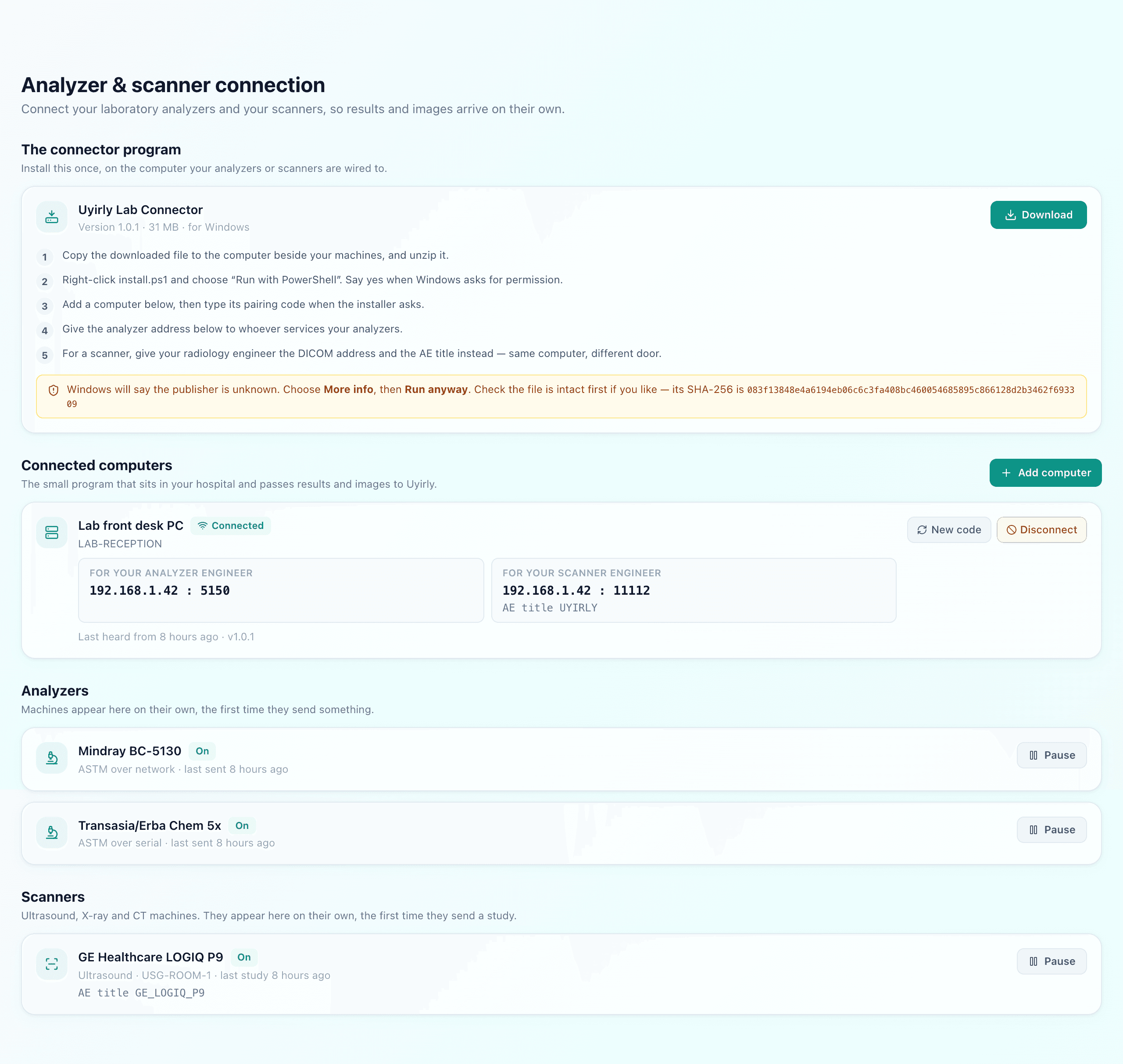
Less than most people expect, for a one-way link.
Install
One program, on the PC beside the machines
Pair
One short code, read off the screen
Point the machine
Engineer sets an address or AE title
Done
No per-instrument configuration
The one thing that genuinely takes time is the analyzer engineer’s visit, and that is usually scheduling rather than work. A well-designed system should recognise the instrument from what it says when it first speaks, rather than making you describe each machine in a settings screen.
The costs to ask about before you buy
- From the software vendor: is there a per-instrument fee, an interface licence, or a commissioning charge? Ask for the number with your actual machine count.
- From the analyzer manufacturer: is the data-output module included on this model, or priced separately? This is the one that ambushes people.
- From whoever installs it: cabling, if the machine is serial and the PC is not next to it.
How Uyirly does it
One small Windows program, installed on the computer that already sits beside your machines and paired with a single code. It listens on the network, on a serial cable and on a watched folder, and it handles DICOM for scanners at the same time. Every result is written to that computer’s disk before any attempt to upload, so an outage costs you the delay and nothing else.
There is no per-instrument fee and no interface licence, however many machines you connect. Two-way interfacing is not built, and we would rather say so here than let you discover it after signing. Full detail on the analyzer integration page, and the laboratory module itself is covered under lab management software.