Discounts are a normal part of hospital billing — a camp patient, a staff relative, a senior citizen, a charity case, a goodwill concession approved by management. Handled loosely, they are also one of the largest and quietest sources of revenue leakage a hospital has. If any staff member can reduce any bill by any amount with no reason recorded, nobody can answer how much revenue was given away last month, or why.
A discount policy with approval controlsfixes this without slowing down the front desk. This guide explains the three pillars of discount control — limits, reasons, and an approval workflow — and how a modern system enforces them.
Why uncontrolled discounts hurt
The problem is not that discounts exist — it is that they are invisible. A 40% concession given quietly at the counter looks identical to a legitimate 5% camp discount if neither is capped, reasoned or reviewed. Over a year, ungoverned discounts can erode margin more than any single cost line, and because there is no record, the leak is impossible to trace or stop.
What good discount control looks like
Pillar 1 — Limits per role
Different roles warrant different trust. A receptionist handling routine concessions might be allowed up to a few percent; an accountant more; an administrator without limit. Setting a maximum discount percentage per role lets small, everyday discounts flow instantly while keeping large ones under control.
| Role | Max discount | Behaviour |
|---|---|---|
| Receptionist | 5% | Applies instantly up to 5% |
| Accountant | 15% | Applies instantly up to 15% |
| Administrator | Unlimited | No cap; also approves others |
Pillar 2 — A reason on every discount
A discount without a reason is a leak; a discount with a reason is a business decision you can audit. Requiring staff to pick a category — camp, staff, senior citizen, charity, management, other — means management can later see not just the total discounted but the why, and question anything that looks off. It costs the cashier one dropdown and changes discounts from a blind spot into a reportable line.
Pillar 3 — The approval workflow
Caps only help if exceeding them does something. The clean model: a discount withinthe staff member’s cap applies immediately; a discount above it is notapplied — it becomes a pending request that an authorised approver must accept before it touches the bill.
Discount within cap vs over cap
Staff enters discount
% or ₹ + reason
Within cap?
Compare to role limit
Yes → applied
Instantly on the bill
No → pending
Awaits approver
Approved
Then applied
The guardrails matter: an approver should not be able to approve their own request, and should not approve above their own authority. That keeps the control honest rather than a rubber stamp.
The kinds of discounts a hospital actually gives
“Discount” is not one thing, and lumping them together is why they become impossible to govern. The common categories each deserve their own reason code:
- Camp discounts— concessional rates for patients from a health camp or screening drive, usually pre-agreed.
- Staff and family— a benefit for the hospital’s own people; predictable and policy-driven.
- Senior citizen — a standing concession many hospitals offer.
- Charity / financial hardship— genuine inability to pay; often needs management sign-off and documentation.
- Management / goodwill— a discretionary concession, exactly the kind that must go through approval.
When each discount carries its category, the monthly picture becomes readable: you can see that camp and senior-citizen concessions are steady and expected, while management goodwill is the line that needs watching. Without categories, it is all just “discount,” and you cannot tell a policy from a leak.
Discount vs write-off — not the same thing
A discountis a reduction applied before or at billing — the patient was never expected to pay the full amount. A write-offis giving up on money already billed and unpaid — the patient owed it and the hospital has decided not to pursue it. They are different events with different accounting and different controls: a discount reduces the bill; a write-off clears a genuine receivable. Blurring them hides bad debt inside “discounts” and flatters your collection numbers. Keep the discount workflow for reductions at billing, and treat unrecoverable dues as an explicit write-off decision.
Reading the discount register: the red flags
Once every discount has a percentage, a reason and (where needed) an approver, the monthly discount register becomes a management tool. The patterns worth acting on:
- One staff member consistently discounting at their maximum— worth understanding why.
- A spike in “management” or “other” reasons— the vaguest categories are where leakage hides.
- Discounts clustering on particular services or doctors— could be legitimate competition, could be something else.
- Total discount as a percentage of gross billing creeping up month over month— the single number the owner should track.
Setting the right caps
Caps that are too tight send every routine concession to an administrator and become a bottleneck; caps that are too loose defeat the purpose. The practical approach is to set each role’s limit at the level of the discounts they genuinely handle day to day — a receptionist covering standard senior or camp concessions, an accountant a little higher for negotiated cases — so the vast majority of discounts apply instantly and only the genuinely large ones escalate. Review the caps every few months against the register: if almost nothing is escalating, they may be too loose; if routine concessions keep queuing for approval, too tight.
How Uyirly offers this
Uyirly builds all three pillars into billing, so control is automatic rather than a matter of trust.
Per role
Max discount % in Settings
% or ₹
With a mandatory reason
Auto-route
Over-cap → approval queue
Audited
Every discount logged
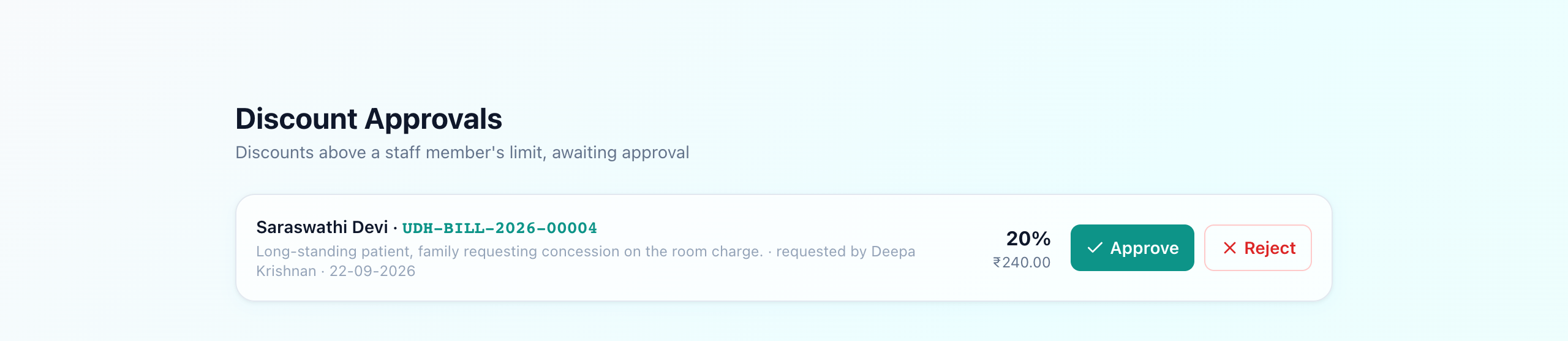
Admins set each role’s cap under Settings → Tariffs & Fees → Discount Limits. On any bill, staff click Discount, choose percent or amount, and pick a reason. Within their cap it applies at once; above it, Uyirly holds it as a pending approval— the bill shows a “discount pending” banner, and it appears in a dedicated Discount Approvals queue for managers to approve or reject (with the self-approval and over-authority guards enforced).
Set caps once, control forever
Where it fits
Discount control sits inside the billing flow alongside bill generation and GST-compliant invoicing. Because the discount is recorded with its reason and (where needed) its approver, it also strengthens your finance trail — the same accountability principle behind cashier shift-close and daily collection reconciliation.