A cashless claim is four separate things that a hospital tends to treat as one: a policy, an eligibility decision before treatment, a claim after it, and a settlement weeks later. Confusing any two of them is how hospitals end up holding a bed for money that was never the blocker, or writing off a shortfall nobody noticed.
The four stages
Policy to money
Policy
Insurer, TPA, limits
Eligibility
Pre-auth before treatment
Claim
Raised, submitted, decided
Settlement
What actually arrives
The two that get conflated are eligibility and settlement. Eligibility — the pre-authorisation — is the insurer saying it will cover a stated amount. That is what should release the patient at discharge. Settlement is the money arriving, often weeks later. A hospital that waits for settlement before discharging is holding a bed for no reason.
The policy, and its sub-limits
A policy is not just a number. It carries a room-rent cap, a co-pay percentage, and the sub-limits that decide what is actually recoverable. A ₹5,00,000 policy with a ₹5,000 room-rent cap will not pay for a ₹9,000 suite, and the difference lands on the patient — which is a conversation to have at admission, not at discharge.
What the desk sees
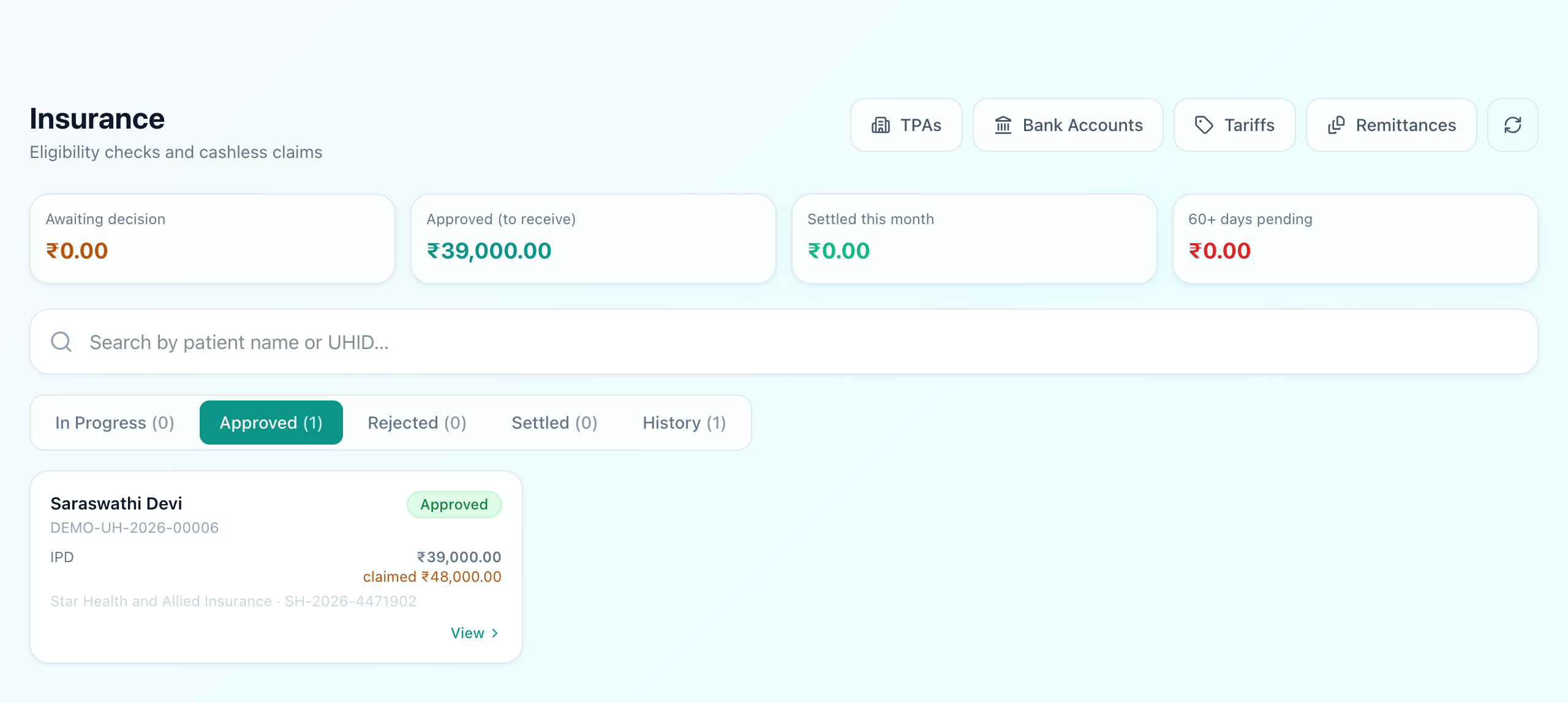
The four figures across the top are the receivables position: what is awaiting a decision, what has been approved and is owed, what settled this month, and what has been pending more than sixty days — the last being the one that quietly becomes a write-off.
On the card itself, the number shown is the one that matters at that stage: an approved claim shows what the insurer agreed, with the amount originally claimed underneath. A claim raised for ₹48,000 and approved for ₹39,000 is a ₹9,000 shortfall somebody has to either recover from the patient or absorb — and the only way that decision gets made is if the figure is visible.
Deductions are the real work
Insurers disallow lines: an investigation deemed unrelated, room rent above the cap, consumables outside the package. The claim record keeps the reason, because a pattern of the same deduction across many claims is a billing habit worth changing rather than bad luck.
TPAs, and getting paid
Most claims pass through a TPA rather than the insurer directly, and payments arrive as a remittance covering many claims at once. Matching that payment back to individual claims is the unglamorous half of insurance work — which is why the TPA list, the hospital's bank accounts and the remittances all live beside the claims rather than in someone's spreadsheet.
What Uyirly does
- Policies with insurer, TPA, member ID, room-rent cap, co-pay and sub-limit notes.
- Eligibility decided and recorded separately from the claim, so discharge turns on pre-authorisation.
- Claims through raised, submitted, approved, rejected and settled, each with its date.
- The approved amount shown against what was claimed, so a shortfall is visible rather than absorbed.
- Deductions recorded with their reason.
- A TPA master, bank accounts and remittance batches for matching payments back to claims.
- Receivables by age, including what has been pending more than sixty days.
Getting started
Insurance sits beside the bill it is claiming againstin Uyirly's hospital management software. Start a 30-day free trial — no credit card.